Best Audio Interface for a Home Studio (Three Tiers, Real Prices)
The best audio interface for most home studios is the Focusrite Scarlett 2i2 (4th Gen) at $224.99: two microphone preamps, an Auto Gain button that sets a level from a real performance, and driver support that keeps working across operating system updates. On a tighter budget the Audient EVO 4 at $137.50 gives you two preamps and smart gain, and the ceiling is the RME Babyface Pro FS at $999.00.
Definition: An audio interface is the box that converts microphone and instrument signals into digital audio your computer can record, and converts them back for your monitors and headphones, replacing the generic converters and shared driver built into the machine.
For most home studios the answer is the Focusrite Scarlett 2i2 (4th Gen) at $224.99, and the deciding factor is not sound. It is driver support that survives operating system updates, two preamps with enough gain for any microphone a home studio is likely to own, and an Auto Gain button that gets a nervous first-timer to a workable level. If money is the binding constraint, the Audient EVO 4 at $137.50 does the same job for eighty seven dollars less.
Everything below is organised around one uncomfortable fact: the interface is the least important box in a home studio, and it is the one people spend the longest choosing. Converter performance converged years ago. The microphone changes the recording, the room changes everything, and the interface mostly decides how pleasant the session is.
What does an audio interface actually do?
Four jobs, in this order. It supplies preamp gain, taking a microphone signal measured in millivolts up to a level the converter can use. It runs an analog to digital converter, sampling that signal and quantising it, typically at 24 bit, which gives roughly 144 dB of theoretical dynamic range. It runs a digital to analog converter the other way for your monitors and headphones. And it provides a dedicated driver, which is the part that decides whether you can work at a 128 sample buffer without crackles.
Notice what is not on that list: tone. A preamp at moderate gain into a modern converter is close to a straight wire. The one exception on this page is the Universal Audio Volt 276 , which deliberately puts a hardware compressor and a vintage transformer mode in the path because some people want to commit to a sound while tracking rather than after.
If you want the full walkthrough of how signal moves from a capsule to a track, the signal flow guide takes it stage by stage, and how to choose an audio interface covers the decision in more depth than a roundup can.
Which audio interface should you buy at your budget?
Three tiers, because these are three different purchases. Beginner optimises for the lowest cost to a working setup. Intermediate is the buy-once pick most readers should land on. Expert is a performance and workflow ceiling that most people should skip, and the section after the cards says exactly who.
Audio interface picks, beginner to expert

Audient EVO 4
Two real Audient preamps and a smart-gain button that sets both levels from an actual performance rather than a spoken test. The compromise is a plastic chassis, no MIDI and a 96 kHz ceiling, none of which limits a first record.
Best for: A first interface where the budget is the actual constraint.
Check price
PreSonus Studio 24c
Two preamps, MIDI in and out, and a 192 kHz ceiling for $149.99. The MIDI ports are the reason it beats most boxes at this money: an older controller or a hardware synth plugs straight in instead of needing a separate USB path.
Best for: A first interface that also has to talk to hardware MIDI gear.
Check price
Focusrite Scarlett 2i2 (4th Gen)
Two preamps, an Auto Gain button, and driver support that keeps working across operating system updates. That last item is worth more over five years than any number on the spec sheet, and it is why this is the most common interface in home studios.
Best for: One microphone and one instrument, which is most people.
Check price
MOTU M4
Four analog in and four analog out, MIDI, and a genuine LCD level meter on the front panel. The meter is the part that changes a session: it is the only unit near this price where you can set a level without looking at a screen.
Best for: Anyone who wants measured performance and real metering over brand familiarity.
Check price
Universal Audio Volt 276
The 76 in the name is the point. A hardware compressor modelled on a 1176 sits in front of the converter, so a vocal is shaped before it is recorded. That is a different workflow, not a spec bump, and it suits people who like to commit.
Best for: Vocalists who want to print a finished-sounding take.
Check price
Focusrite Scarlett 4i4 (4th Gen)
Four in and four out with MIDI, which is the smallest box that records a stereo source and a mono source at once while feeding a separate headphone mix and an outboard hardware loop.
Best for: A duo, a drum overhead pair plus a kick, or an outboard insert chain.
Check price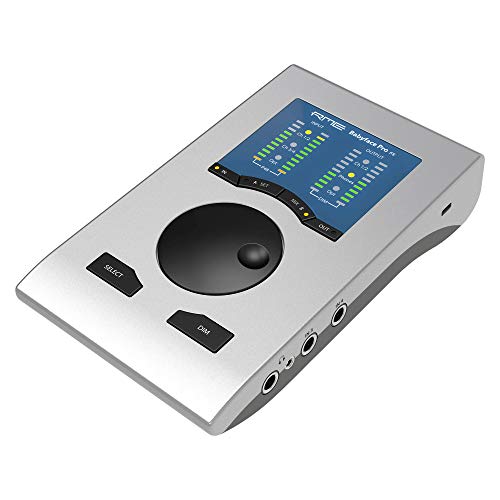
RME Babyface Pro FS
RME TotalMix FX and the driver reputation that goes with it. Four analog in, four analog out, ADAT both ways, bus powered, and a routing matrix that behaves like a small console. You buy this once and stop thinking about the interface for a decade.
Best for: Someone who has already outgrown two interfaces and knows exactly why.
Check price
Focusrite Scarlett 18i20 (4th Gen)
Eight microphone preamps, ten analog outputs, ADAT and S/PDIF, in a rack unit. This is a drum kit and a band in one pass rather than a better version of a two channel box, and it is the wrong purchase if you record one source at a time.
Best for: Tracking a full kit or a live band in one take.
Check pricePrices change often, confirm on Amazon. As an Amazon Associate we earn from qualifying purchases.
How do these interfaces compare on paper?
Physical analog jacks only in the input and output columns. Manufacturers routinely advertise eighteen inputs by counting eight ADAT channels you cannot use without buying another box, so digital expansion is listed separately.
| Interface | Price | Mic pres | In / Out | Max rate | MIDI | Bus powered |
|---|---|---|---|---|---|---|
| Behringer UMC22 | $52.90 | 1 | 2 / 2 | 48 kHz | No | Yes |
| Audient EVO 4 | $137.50 | 2 | 2 / 2 | 96 kHz | No | Yes |
| PreSonus Studio 24c | $149.99 | 2 | 2 / 2 | 192 kHz | Yes | Yes |
| Focusrite Scarlett 2i2 | $224.99 | 2 | 2 / 2 | 192 kHz | No | Yes |
| MOTU M4 | $279.95 | 2 | 4 / 4 | 192 kHz | Yes | Yes |
| UA Volt 276 | $299.00 | 2 | 2 / 2 | 192 kHz | Yes | Yes |
| Focusrite Scarlett 4i4 | $299.00 | 2 | 4 / 4 | 192 kHz | Yes | Yes |
| Focusrite Scarlett 18i20 | $749.00 | 8 | 8 / 10 | 192 kHz | Yes | No |
| RME Babyface Pro FS | $999.00 | 2 | 4 / 4 | 192 kHz | Yes | Yes |
Read that table for the preamp column and the MIDI column, not the sample rate column. Almost everything here reaches 192 kHz and almost nobody should record there. The sample rate and latency chart shows what each rate costs you in buffer time, and 44.1 versus 48 versus 96 kHz settles the argument: 48 kHz is the correct default for almost every home session.
How much preamp gain do you actually need?
This is the spec that decides whether an interface works with the microphone you want, and it is the one buyers most often skip. Microphone output is measured in millivolts per pascal. A typical large diaphragm condenser puts out around 22 mV per pascal and needs roughly 35 to 40 dB of gain for a normal sung vocal. A low-output dynamic sits nearer 1.1 mV per pascal and needs 60 to 65 dB.
That is a 25 dB gap, and it is the difference between an interface being fine and being unusable. Fourth generation Scarlett preamps publish 69 dB, which clears a low-output dynamic with room to spare. Plenty of older and cheaper boxes stop at 50 to 56 dB. At that point you are pushing the preamp into its noisiest region to reach a level, and you hear hiss under every quiet passage.
Run your own microphone and source through the gain staging calculator before you buy. If the number comes out above what your shortlist publishes, the fix is an inline booster of about 25 dB at the microphone end rather than a more expensive interface, and it costs far less.
The mistake I made for years, and that I still see in nearly every session file someone sends me, is setting gain from a spoken "check one two" rather than from the loudest thing the performance is actually going to do. A singer speaks at one level and sings a chorus about 12 dB louder. Set the preamp on the spoken line, aim for a comfortable meter reading, and the first real take clips on the first chorus. I now ask for the loudest phrase in the song before I touch a knob, set peaks around -10 dBFS from that, and accept that the verses will look quiet. They are supposed to. Twenty four bits gives you about 144 dB of range, so headroom costs nothing and a clipped take costs the take.
What latency should you expect, and what buffer should you use?
Latency comes from the buffer, not from the price. The formula is simple:
ms = buffer samples / sample rate x 1000
So 128 samples at 44.1 kHz is 2.9 ms one way, and 128 at 48 kHz is 2.67 ms. Round trip is roughly double that plus converter and driver overhead, which is typically another 2 to 6 ms and is exactly why the figure your DAW reports never matches the delay you feel. A good driver does not make the buffer smaller, it makes a small buffer stable.
| Buffer | One way at 44.1 kHz | One way at 48 kHz | Rough round trip | What it is for |
|---|---|---|---|---|
| 64 samples | 1.45 ms | 1.33 ms | 5 to 9 ms | Tracking a soft synth live |
| 128 samples | 2.90 ms | 2.67 ms | 8 to 12 ms | The tracking default |
| 256 samples | 5.80 ms | 5.33 ms | 14 to 18 ms | Tracking a dense session |
| 512 samples | 11.61 ms | 10.67 ms | 25 to 29 ms | Mixing, plugins loaded |
| 1024 samples | 23.22 ms | 21.33 ms | 48 to 52 ms | Mixing only, unplayable |
Work at 128 while tracking and raise the buffer for mixing. The latency buffer calculator does the arithmetic for your rate, and how to fix latency in your DAW covers the settings that actually move the number.
Who should not buy the expert tier?
Most people reading this. Plainly: do not buy the RME Babyface Pro FS at $999.00 as a first interface, or a second one. It will not make your recordings sound better than a $225 Scarlett in a home room, and the specific things it is superb at, a deep routing matrix, rock solid drivers under heavy channel counts, ADAT expansion, are things you only value after you have hit their absence. If you cannot name the routing problem you are trying to solve, you do not have it yet.
The same applies to the Scarlett 18i20 at $749.00. Eight preamps is the right answer for a drum kit and a band tracked live. It is the wrong answer for one voice at a time, where you are paying $749 to use two of eight channels and giving up bus power and desk space to do it.
The honest arithmetic: the difference between the EVO 4 and the Babyface is $861.50. That money buys four corner bass traps, four first reflection panels and a decent microphone, and every one of those changes what comes out of your speakers more than a converter upgrade will. Put your room dimensions into the room mode calculator and then decide where the money goes.
How many inputs do you actually need?
Count the things you record simultaneously, not the things you own. This is where most overbuying happens.
- One at a time, voice or guitar. Two preamps is already one more than you need. The EVO 4 or the Scarlett 2i2 .
- Voice and guitar together, or a singing guitarist. Two preamps, used properly. Same boxes.
- A stereo source plus a mono source. Four analog inputs. The MOTU M4 or the Scarlett 4i4 .
- A drum kit. Four preamps minimum for a usable kit, eight for a comfortable one. This is where the 18i20 stops being overkill and starts being the point.
Outputs matter more than people expect. Four analog outputs let you feed monitors and an outboard hardware loop at the same time, or monitors and a second headphone mix. Two outputs mean the monitors are the only thing you can send to.
What do you plug into it?
An interface on its own does nothing. The minimum working chain is a microphone, an XLR cable, a stand, headphones and the interface, and buying those piecemeal means owning parts of a chain that cannot do anything alone. The beginner build puts that whole set together with a running total, and the intermediate build is the one most people should have bought first.
For the individual choices: vocal microphones if your room has some treatment, dynamic microphones if it does not, tracking headphones for the take itself and monitors for small rooms once the corners are handled. If you are still deciding between an interface and a USB microphone, that comparison is the one to read first, because it changes everything downstream.
Here is the sequence I would follow if I were starting over with a fixed budget. Buy the cheapest interface on this page that has two preamps and enough gain for the microphone you want. Buy that microphone. Buy a stand, two cables and closed back headphones. Then stop buying gear and spend everything left on corner absorption, because the room is the only part of the chain that is printed permanently into every file and cannot be fixed later. I have never once regretted a cheap interface. I have regretted a room with untreated corners on every mix that fell apart in the car.
What about 32-bit float, loopback and other spec sheet features?
32-bit float recording, on the Zoom UAC-232 and the Steinberg UR22C , is genuinely useful in one situation: unrepeatable sources where you cannot set gain in advance. It captures a range wide enough that a clipped-looking take can be pulled back down intact. For a vocal you can rehearse, it solves a problem good gain staging already solved.
Loopback routes your computer playback back into the interface as an input, which matters for streaming and screen recording and not at all for making records.
Direct monitoring is on essentially every unit here and is the feature that makes latency a non-problem while tracking: the input is fed to your headphones in the analog domain before the computer ever sees it, so there is no round trip to feel. The catch is that you hear the raw signal without plugins, which is why singers ask for reverb and why the Babyface including a reverb in its monitoring mixer is a real workflow difference rather than a bullet point.
Bus power is worth more than it sounds. A bus powered interface travels, and it means one cable on the desk instead of two. Everything on this page is bus powered except the 18i20, which is a rack unit and has other priorities.
The short version
Buy the Scarlett 2i2 4th Gen at $224.99 if you want the safe default. Buy the EVO 4 at $137.50 if the budget is tight and put the difference into panels. Buy the MOTU M4 at $279.95 if you want four inputs, MIDI and a real front panel meter. Buy the Volt 276 if you want to commit a compressed vocal to tape rather than fix it afterwards. And leave the Babyface Pro FS alone until you can name the routing problem it solves. Full specifications for every unit on this page live in the interface database, and the gear index has the rest of the chain.
Full reviews of the interfaces here
The Scarlett 2i2 review covers the safe default and the MIDI ports it does not have. The Scarlett 4i4 review covers the unit whose name says four inputs and whose specification says two preamps. The MOTU M2 review covers the only interface near the price with a real front panel meter.
Frequently asked questions
What audio interface should most home studios buy?
The Focusrite Scarlett 2i2 4th Gen at $224.99, for one reason that has nothing to do with sound: driver support that survives operating system updates. Two preamps covers one voice plus one instrument, which is the actual shape of most home sessions. If the budget is tighter, the Audient EVO 4 at $137.50 gives you two preamps and smart gain for eighty seven dollars less.
Do expensive audio interfaces sound better than cheap ones?
Not in a way you will hear in a home room. Converter performance converged years ago, and the difference between a $150 unit and a $999 unit sits below the noise floor of an untreated bedroom. What the expensive one buys is preamp gain, driver stability, routing, metering and headphone output power. Those are real benefits, and none of them is sound quality. Spend the difference on the room.
How much preamp gain do I need on an audio interface?
About 40 dB for a normal sung vocal into a condenser like the AT2020, and 60 to 65 dB for a low-output dynamic like the SM7B at speaking distance. Fourth generation Scarlett preamps publish 69 dB, which clears both. Older and cheaper boxes commonly stop at 50 to 56 dB, and at that point you hear preamp hiss before you reach a usable level.
Does an audio interface reduce latency compared to onboard audio?
Yes, substantially, because it replaces a generic shared driver with a dedicated one. Latency itself comes from the buffer: 128 samples at 44.1 kHz is 2.9 ms one way, and round trip is roughly double that plus another 2 to 6 ms of converter and driver overhead. A real interface makes small buffers stable, which is the part that matters while tracking.
Do I need MIDI ports on an audio interface?
Only if you own hardware with five pin DIN sockets. A modern controller connects over USB and never touches the interface, so the Scarlett 2i2 having no MIDI is a non-issue for most buyers. If you own an older synth, a drum machine or a controller from before USB class compliance, the PreSonus Studio 24c, MOTU M4 and Scarlett 4i4 all have MIDI in and out.
Is USB or Thunderbolt better for a home studio interface?
USB, for nearly everyone. Thunderbolt shaves a small amount of round trip latency and matters when you are running a large DSP-accelerated session, but a USB-C class compliant interface at a 128 sample buffer is already comfortable for tracking. USB also works on more machines, survives more operating system changes, and costs less at every tier.
Working out your own room and signal chain? The Home Studio Build Planner is the paid version of these pages: 8 printable worksheets you fill in with your own numbers, plus the full PDF, $29.